
Enterpristore HelpDesk
The Complete Helpdesk Solution for Your Business

  • All-in-One Ticketing System: Streamline inquiries and automate workflows for efficient support.
  • Knowledge Base Management: Empower customers with self-service access to FAQs and articles.
  • Advanced Ticket Management: Centralize and categorize tickets with priority tracking and attachment support.
  • Automation & Analytics: Enhance efficiency with intelligent workflows and insights into performance metrics.
Introduction

Enterpristore Helpdesk:

Comprehensive Feature Overview
The Enterpristore Helpdesk is a comprehensive ticketing and support system designed to elevate customer service operations on the Enterpristore Ecommerce platform. It includes a robust Knowledge Base Management system that empowers customers with self-service access to articles, FAQs, and documentation, while also offering analytics to identify knowledge gaps.

The Email & Communication Management module automates ticket creation from incoming emails, providing priority classification and customizable email templates for streamlined communication. The Ticket Management System centralizes inquiries, supports attachment uploads, and enables advanced tracking and categorization of tickets based on priority and status.

User & Team Management facilitates role-based access and performance monitoring, ensuring optimal workload distribution among agents. Additionally, Automation & Workflows enhance operational efficiency through intelligent workflows and integration capabilities with other business systems. Customization options allow for branding and personalized communications, while Reporting & Analytics deliver insights into performance metrics and customer satisfaction.

Other notable features include mobile accessibility, security compliance, and integration with social media and live chat. Overall, the Enterpristore Helpdesk transforms customer support into a proactive service that fosters stronger customer relationships, reduces operational costs, and enhances overall efficiency.

Key Features

Knowledge Base Management

  • Self-Service Portal: Grant customers immediate access to extensive articles, FAQs, and documentation.
  • Proactive Problem Resolution: Tackle common customer inquiries before they escalate into support tickets.
  • Searchable Content: Utilize advanced search features to help customers quickly find relevant information.
  • Multi-format Support: Support various formats including text, images, videos, and downloadable resources.
  • Analytics & Insights: Monitor article views and identify areas needing improvement.

Email & Communication Management

  • Automatic Ticket Creation: Transform incoming support emails into organized tickets.
  • Email Threading: Preserve conversation history and context across multiple exchanges.
  • Priority Classification: Automatically categorize emails based on keywords and sender importance.

Mailbox Configuration

  • Multiple Email Channels: Set up unlimited support email addresses (e.g., sales@, support@, billing@).
  • Department Routing: Automatically direct emails to the appropriate teams based on recipient addresses.
  • Email Templates: Use professionally formatted emails with company branding.
  • Delivery Confirmation: Track email delivery and read receipts.

Saved Replies & Templates

  • Pre-written Responses: Develop standardized replies for common inquiries.
  • Personalization Variables: Automatically include customer names, order details, and custom fields.
  • Team Libraries: Share effective responses across your support team.
  • Version Control: Monitor and update template performance over time.

Ticket Management System

  • Unified Inbox: Centralize all customer inquiries from various channels.
  • Automatic Classification: Smart categorization based on content analysis.
  • Unique Ticket IDs: Simplify tracking and referencing for customers and agents.
  • Attachment Support: Facilitate file uploads, screenshots, and documents.

Advanced Ticket Management

  • Priority Levels: Classify tickets as urgent, high, medium, or low priority.
  • Status Tracking: Monitor tickets through various stages (Open, In Progress, Pending, Resolved, Closed).
  • Assignment Rules: Distribute tickets intelligently based on agent expertise and workload.
  • Escalation Procedures: Automatically escalate overdue or high-priority tickets.
  • SLA Management: Set and monitor service level agreements with automatic alerts.

Ticket Tags & Organization

  • Custom Tagging System: Create tags for products, issues, customers, or other relevant categories.
  • Advanced Filtering: Quickly find tickets using multiple search criteria.
  • Bulk Operations: Update multiple tickets at once.
  • Reporting Integration: Generate reports based on tag analytics.

User & Team Management

Agent Management:

  • Role-Based Access: Assign permissions for agents, supervisors, and administrators.
  • Skill-Based Routing: Allocate tickets based on agent expertise.
  • Performance Monitoring: Track response times, resolution rates, and customer satisfaction.
  • Shift Management: Schedule coverage and manage agent availability.

Team Organization:

  • Department Structure: Group agents into teams (Technical, Billing, Sales, etc.).
  • Workload Distribution: Balance ticket assignments among team members.
  • Collaboration Tools: Utilize internal notes and team communication features.
  • Training & Onboarding: Access built-in resources for new agent training.

Automation & Workflows

Intelligent Workflows:

  • Event-Triggered Actions: Automate responses based on specific conditions.
  • Time-Based Automation: Schedule actions for specific times or intervals.
  • Conditional Logic: Create complex workflows with if/then scenarios.
  • Integration Capabilities: Connect with CRM, billing, and other business systems.

Workflow Examples

  • Auto-assign tickets based on keywords or customer segments.
  • Send follow-up emails after ticket resolution.
  • Escalate unresolved tickets after specified timeframes.
  • Generate internal alerts for VIP customers.

Customization & Branding

Brand Customization:

  • Visual Identity: Apply company colors, logos, and styling.
  • Custom Domain: Use your own domain for the helpdesk portal.
  • Personalized Communications: Brand all customer-facing emails and notifications.
  • White-Label Options: Remove Enterpristore branding for enterprise clients.

Reporting & Analytics

Performance Metrics:

  • Response Time Analytics: Track first response and resolution times.
  • Customer Satisfaction Scores: Utilize built-in CSAT and NPS surveys.
  • Agent Performance Reports: Assess individual and team productivity metrics.
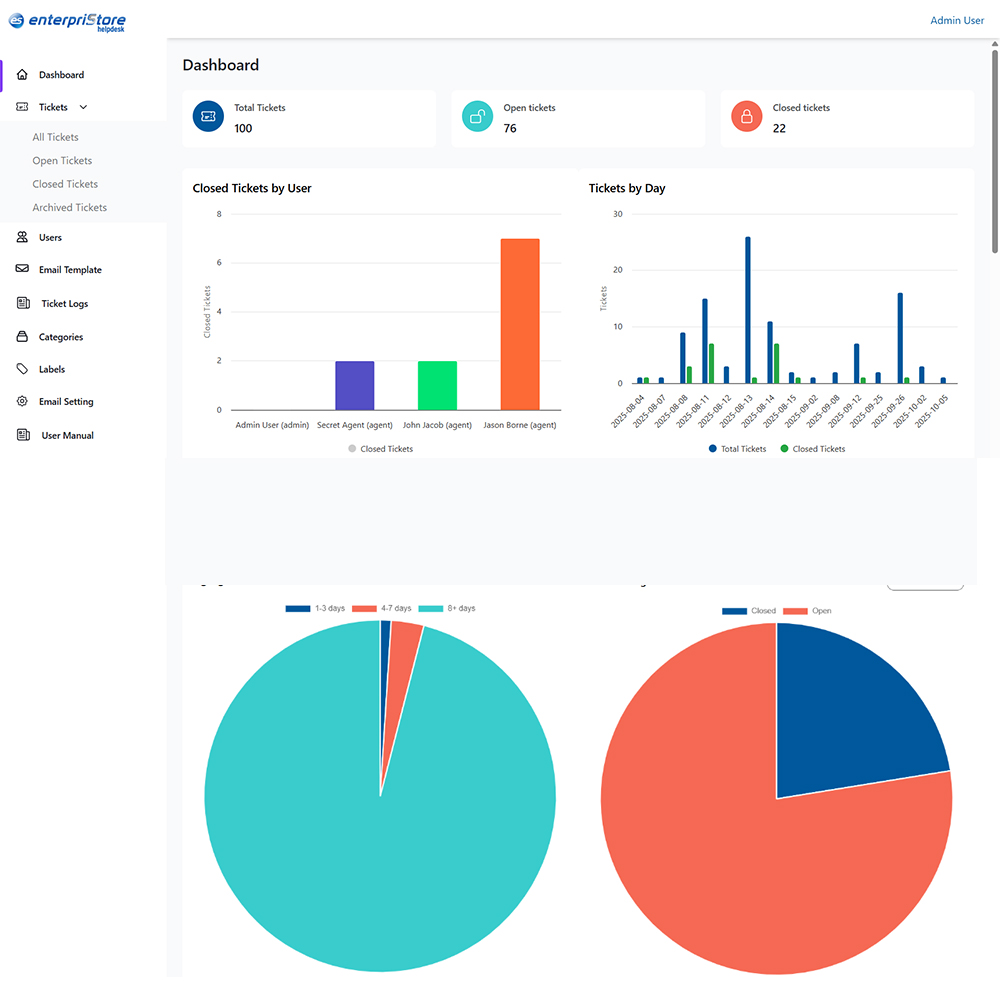
  • Trend Analysis: Identify patterns in ticket volume and types.

Business Intelligence:

  • Custom Dashboards: Create personalized views for different stakeholders.
  • Export Capabilities: Generate reports in various formats (PDF, Excel, CSV).
  • Real-Time Monitoring: Receive live updates on ticket queues and agent status.

Advanced Features

Integration Capabilities:

  • Ecommerce Integration: Deep integration with the Enterpristore platform.
  • Third-Party Connections: API support for popular business tools.
  • Social Media Monitoring: Track and respond to social media mentions.
  • Live Chat Integration: Seamlessly convert chat conversations into tickets.

Mobile & Accessibility:

  • Mobile-Responsive Design: Access the helpdesk from any device.
  • Mobile Apps: Dedicated apps for agents and customers.
  • Accessibility Compliance: Adhere to WCAG guidelines for inclusive design.

Security & Compliance:

  • Data Encryption: Ensure end-to-end security for all communications.
  • GDPR Compliance: Implement built-in privacy controls and data management.
  • Audit Trails: Maintain complete logging of all system activities.
  • Regular Security Updates: Conduct continuous security monitoring and updates.

Benefits Summary

  • Improved Efficiency: Reduce response times by up to 50%.
  • Cost Reduction: Lower support costs through automation and self-service options.
  • Better Customer Experience: Deliver consistent, professional support across all channels.
  • Scalability: Expand your support team without compromising quality.
  • Data-Driven Decisions: Leverage analytics for informed improvements.
  • 24/7 Availability: Provide round-the-clock support through automated responses and the knowledge base.

This all-inclusive helpdesk solution transforms customer support from a reactive cost center into a proactive customer success driver, enabling businesses to build stronger relationships while minimizing operational overhead.